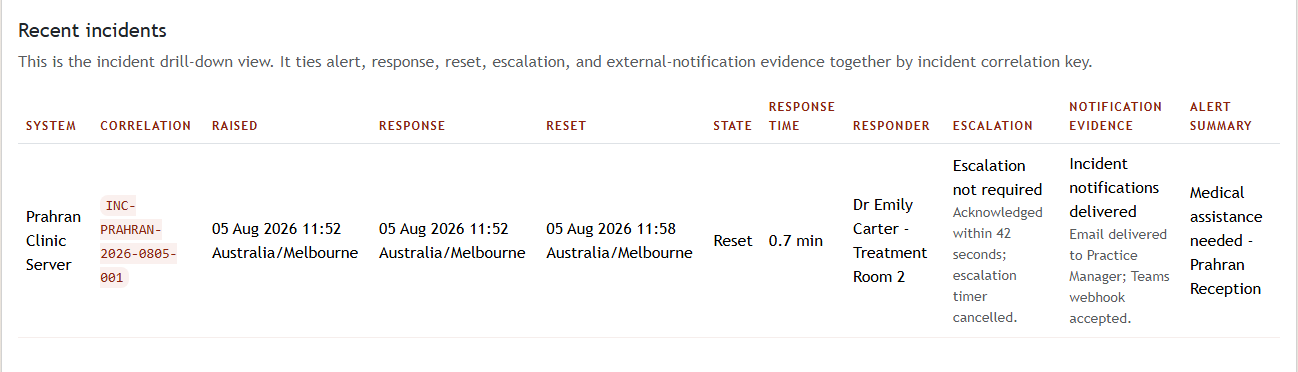


See a real duress incident report: raise, response, reset, timestamped.
INCIDENT #2041, Tuesday 10:42
10:42:05 RAISED Reception PC 2 (Front desk), hotkey
10:42:31 ACKNOWLEDGED Practice Nurse station, response time 26 seconds
10:51:12 RESET Reception PC 2, incident closed
Notifications: Teams channel ✓ · Email to practice manager ✓ This number is the point. The 26-second delta between raise and acknowledgement: who needed help, who came, and how fast.
After an incident, you can show exactly who was alerted, who responded and how fast, dated evidence for your incident register, your WHS/OSHA documentation, and your next accreditation or inspection. Teams, Slack or email copies of the alert are recorded alongside it.
Is this a legal record?
It’s operational evidence for review, a dated account of what the system recorded, not a certified legal record. Most teams use it for their incident register, safety committee and accreditation evidence.
What the incident record actually looks like

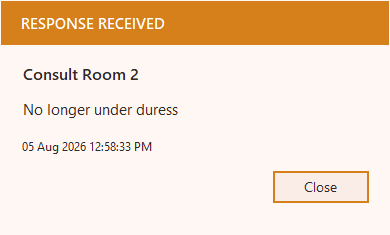
And the all-clear that closes it

Tell us about your site.
Tell us your team size and setting, and we’ll show you how Duress Alert works on your own desks and what a rollout looks like. We get back to you quickly.
Download the sample incident report (PDF)
Name and email only. Related: buyer checklist · where incident data is stored.
