
Press the desktop button. Show the alert onsite. Record the response.
1. Pick the PC
We remotely install the small Duress app on a PC you already leave on, your reception or practice-management machine. No server hardware.
2. Install the button
On each computer, about five minutes each, done with you over a screen share, free. (IT teams can push it to every machine silently instead.)
3. Choose & drill
You choose which computers run Duress Alert, then run your first drill. Most teams are protected the same week.
Raise, respond, reset.
Ready on the workstation
A small dot sits quietly in the corner of every screen. Staff know at a glance the system is live.
Immediate local broadcast
One click, hotkey or desk button, and a pop-up appears over whatever colleagues are working on, showing exactly where help is needed. No sound in the room. Nothing the visitor can see.
Response and record
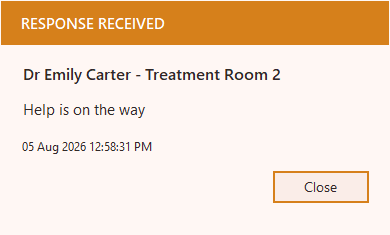
The first colleague to respond is recorded, and the person who raised the alert sees their button turn orange. They know help is on the way before it arrives.
The moment a colleague responds, the person who raised the alert sees their button turn orange, they know help is coming before it arrives.
Works on shared and remote desktops too, Have an IT team, multiple sites, or shared/remote desktops? See our IT deployment page, silent installs, central configuration and rollout at any scale. Alerts appear over whatever staff are working on, no siren, nothing the visitor sees.
Pricing
Team Safe
Group Safe
Corporate Safe
Multi Site Safe
Prices exclude GST. Local taxes are added where they apply.
One-off install A$99. Prices in AUD. In the UK, USA, Canada or Europe? See local pricing.
Start your free 21-day trial, covering up to 25 computers. Configure it and roll it out across your site, at no cost. The trial itself is free. If you go ahead afterwards, we can set it up with you for a one-off A$99. When you move from the trial to a full licence there is no extra effort, everything you have set up simply keeps running. No payment details to start, and you can cancel anytime.
Prefer something you can press without looking?
Add a physical button where it helps, from A$25 plus delivery. Unlike a hardwired button, Duress Alert warns you on screen the moment a button is unplugged, and confirms when it’s back, so you never discover a dead button during an emergency. And if a button ever fails, staff can still raise the alert from the screen, tray icon or hotkey.
Orange means someone has picked it up
The four we get asked first.
They are two names for the same thing. “Duress alarm” is the usual term in Australian healthcare, government and community services; “panic button” is more common in retail, banking and in the UK and US. Both mean a way for a person to signal that they need help without announcing it to the room. Duress Alert is the software version, on every screen your team already uses. There is more on the wording and the differences that actually matter on our Windows and Mac client page.
A typical site is running the same afternoon. You pick one always-on PC to act as the server, build the configuration once, then install the client on each workstation. Mac machines are set up manually, by your team or with our help. The longest part is rarely the software: it is agreeing who responds and running one drill so everybody has seen the three states once. Our rollout playbook walks through it step by step.
Yes. There is a Windows client and a Mac client, and they alert each other on the same network, so a mixed site works as one system. The A$25 USB button works on Mac as well, and once it is configured macOS shows a warning if the button is unplugged. Mac installation is done manually, either by your team or with us assisting. Details are on the Windows and Mac client page.
No. The alert path is local. A trigger goes from the workstation to the server PC on your own network and back out to every other client, so alerting keeps working when your internet connection is down. The cloud is used for licensing, configuration and incident reporting, not for delivering the alert. We set out the honest failure modes on how local alerting works during an outage.
Tell us about your site.
Tell us your team size and setting, and we’ll show you how Duress Alert works on your own desks and what a rollout looks like. We get back to you quickly.