
The architecture: local alert path, central control. Built for IT teams and MSPs.
A small server application on any always-on Windows PC holds your configuration and routes alerts across your LAN. The cloud handles licensing, downloads and reporting only, it is never in the live alert path.
- Install
- Silent MSI
- Control
- Central policy
- Alert path
- Your LAN
- Clients
- Windows and Mac
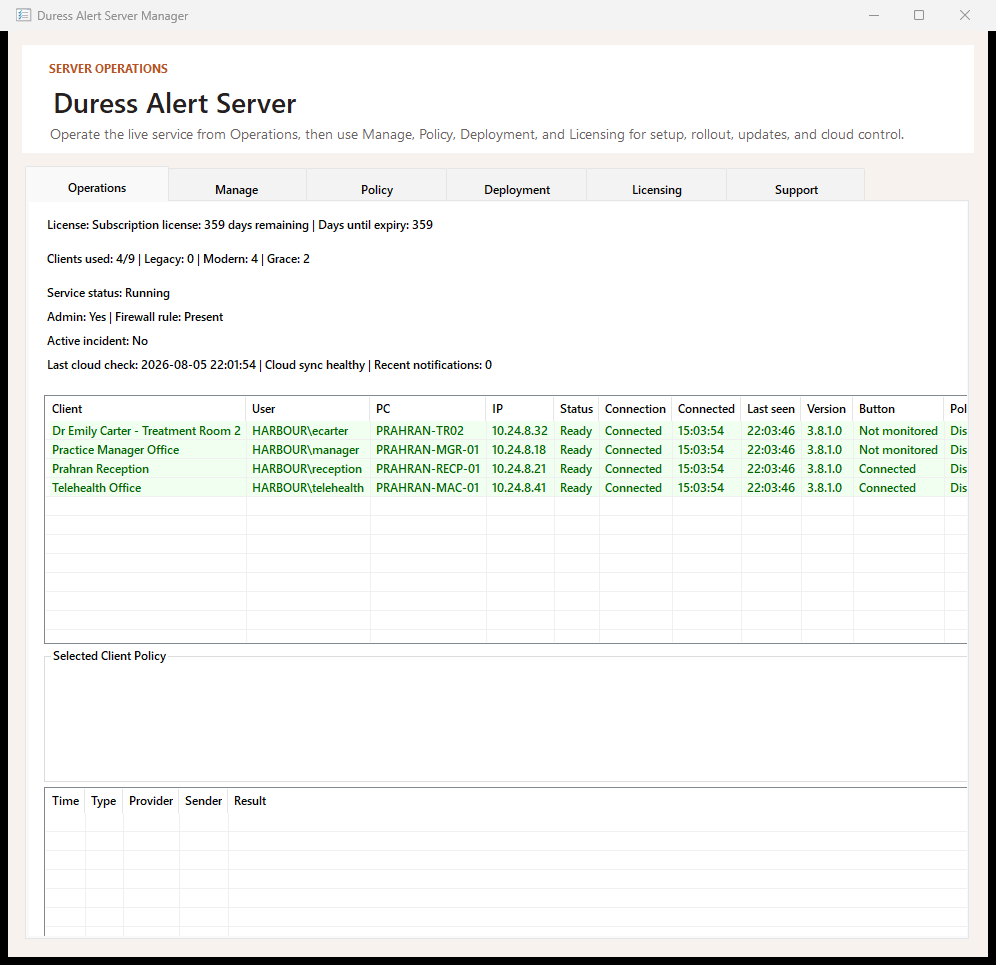
Silent install, from your RMM
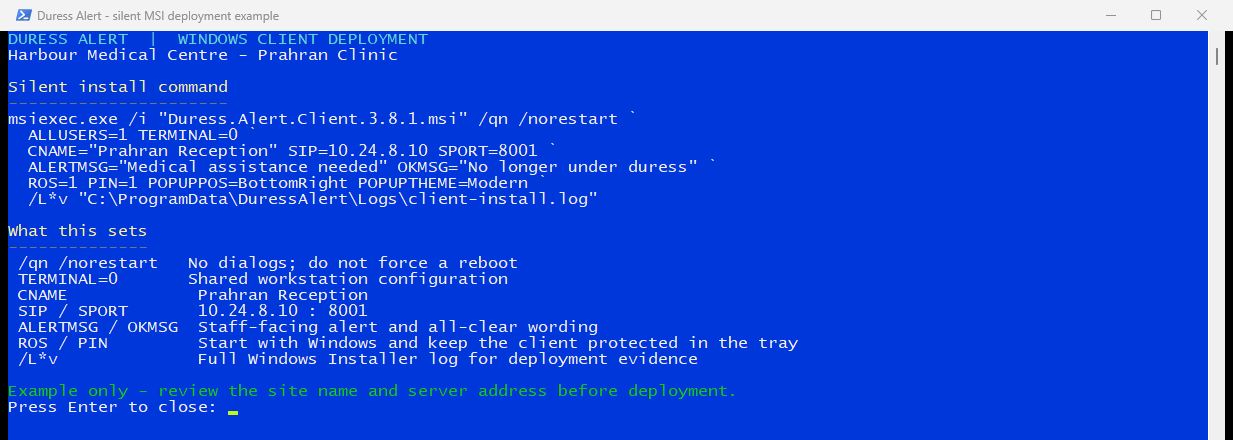
Client MSIs are generated by the server with your configuration already baked in, endpoint, policy and location settings included. Deploy silently via GPO, Intune, or your RMM (we deploy via NinjaOne ourselves). Standard silent install works out of the box:
msiexec /i DuressAlertClient.msi /qnPrefer scripted control? Every configuration setting can also be passed as an MSI property for fully parameterised rollouts. No per-machine setup, no configuration drift. Change presentation, sound, startup and escalation settings later from the server, and connected clients pick them up. Every client follows.
Network requirements
| Path | Scope | Notes |
|---|---|---|
| Client ↔ server | Local network only | Your local network only, on a configurable port (default TCP 8001). By default, clients contact only your server. |
| Server → cloud | Outbound HTTPS | Duress Alert API endpoints, licensing, downloads and reporting only. Never in the live alert path. |
| Webhooks | Outbound | Slack, Microsoft Teams or Google Chat, plus SMTP / Microsoft 365 / Gmail email. |
| Windows Firewall | Auto-configured | Server sets the required rules where it has rights, and shows status either way. |
Mac and RDS
- Mac. Mac desktop clients run on the same local alert path as Windows, with the same on-screen experience. The client installs from a provisioning bundle prepared by the server, and configures itself at first launch. Install and configuration are hands-on, your team can run them, or we can do it with you over a secure screen share. (On Mac, staff can trigger from the screen, hotkey or USB button.)
- RDS / published desktops / thin clients. Dedicated rollout path so every user on a shared host still gets their own button. Certified on Windows Server 2025.
- Platform coverage. Certified on Windows 11 and the current macOS release. Tell us your fleet and we’ll confirm what we can support.
What the cloud never sees
The live alert path, trigger, pop-ups, acknowledgement, runs entirely on your LAN. Cloud reporting receives incident lifecycle records (raise/respond/reset timestamps, workstation identity, notification outcomes) for your audit trail. Duress Alert has no patient or case fields. It records who raised an alert, from which computer, and when.
Cloud services are hosted in Australia, with other regions coming. Reporting data is kept while you are a customer, and deleted on request.
What we are building next
We publish what we are building so you can plan around it. Everything described on this page works today without any of it. We do not put dates against a feature until it is certified, and nothing here changes how alerts reach your own team.
Escalation to paid response services
An optional extra layer for sites that want one. Colleagues in the building still see the alert first, in seconds. Where a site also wants a paid monitoring or guard response service as a fallback, the alert will be able to escalate to that service as well. It stays optional, and it is an addition to the people already in your building, never a replacement for them.
Central multi site configuration
Multi Site Safe licences already cover multiple locations today. Next is a single console to manage locations, room names, responders and reporting across every site from one place, instead of configuring each site on its own.
Phone integration for alerting
Alerts to phones, so a responder away from their screen is still notified. Today an alert reaches every nominated computer on site, plus webhooks to Slack, Microsoft Teams and Google Chat, and email.
Got an idea for extending Duress Alert?
If Duress Alert nearly fits but not quite, tell us what is missing. We take on custom development for a single site, and where a change would help other sites too you can part-sponsor an enhancement: we build it, it ships as part of the product, and it stays supported in future releases instead of being a one-off you have to maintain.
Silent install, with the settings baked in
Tell us about your site.
Tell us your team size and setting, and we’ll show you how Duress Alert works on your own desks and what a rollout looks like. We get back to you quickly.
Get the Security & Deployment Pack (PDF)
Questions? Email us or send us a message, and we’ll get back to you quickly.
Roll it out across your fleet.
Start the trial and push it from your RMM, or talk it through with us first.