
Duress Alert for the workplaces where nearby colleagues are the response.
Alerts stay local. The cloud only handles licensing and reporting, never the emergency.
- Sectors
- Clinics to councils
- Setup
- Minutes per PC
- Alerts
- On screen
- Records
- Incident history
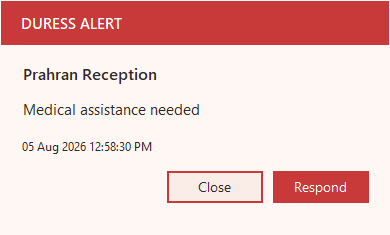
- Works when the internet is down
- Alerts never leave your building
- Orange = help is coming
- Audit trail for your incident register
- You install it yourself in minutes
- Free 21-day trial
Australia & NZ
GP & medical clinics, NDIS providers, councils, community services, libraries. Medical, RACGP C3.5 evidence.
GP clinics · NDIS · Councils · Australia pricing
“The safety of our staff is paramount.”, Liz Baker, Practice Manager, Perth
United Kingdom
GP surgeries, housing associations, council services, legal offices. CQC-ready · HSE-recognised hazard.
Legal offices · Reception · UK pricing
“If it’s green, we can see her.”, Sally Anderton, Legal Practice
USA & Canada
Community health, behavioral health, county and city offices. OSHA / Joint Commission (US) · OHSA (CA).
Not sure which page fits? Compare your options or browse all industry pages below.
Pricing from A$99 install (AUD). In the UK, USA, Canada or Europe? See local pricing on the country pages.
Tell us about your site.
Tell us your team size and setting, and we’ll show you how Duress Alert works on your own desks and what a rollout looks like. We get back to you quickly.