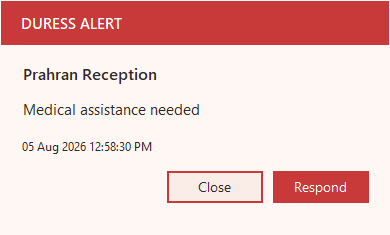
The strongest fit is fixed-site staff safety where nearby colleagues can respond.
Duress Alert is best understood as local-first desktop duress software for workplaces where nearby colleagues are the fastest and most realistic response. That makes the comparison different from mobile lone-worker apps, hospital-grade wearable systems and fixed hardwired buttons.
Software-first rolloutUses existing workstations, which can shorten rollout and reduce dependency on new physical infrastructure.
Local visibilityThe core alert is meant to be seen by the people close enough to help, not buried in an inbox or phone notification.
Testable workflowTeams can practise the alert, acknowledgement and reset path without treating every test like a hardwired alarm event.
Responder feedbackThe orange response state helps close the loop: the initiator can see that someone is coming.
What to compare before you choose
Different staff safety systems solve different problems. The right choice depends on where staff work, who can respond, and whether the alert needs to stay visible inside the workplace.
| Option | Best fit | Strengths | Trade-offs |
|---|---|---|---|
| Duress Alert | Clinics, reception desks, legal offices, social services and fixed workplaces where nearby colleagues are the first response. | Discreet Windows and Mac desktop clients, onsite server alerting, visible acknowledgement, optional physical buttons, Windows/RDS rollout options, server policy, cloud reporting and signed licensing. | Not intended to replace field lone-worker GPS tracking, hospital-wide RTLS, monitored emergency dispatch or specialist clinical location systems. |
| Desktop panic button software | Teams that want a visible local alert without cabling fixed buttons into every room. | Uses existing computers, can be easier to test, and can show who needs help, where they are and who responded. | Confirm onsite-server behaviour, Windows/Mac rollout support, central policy control, reporting depth and alert visibility before choosing a platform. |
| Clinic-focused screen alert tools | Small practices comparing simple software buttons that show a visual or audible alert across practice computers. | Can be a useful starting point when the immediate need is a basic screen-wide alert for nearby staff. | Check what happens after the alert: acknowledgement, initiator feedback, reset flow, incident history, client management, Mac/RDS support and cloud dependency. |
| Wearable or hardwired panic systems | Hospitals, behavioural health wards, aged care and large campuses needing room-level devices or specialist infrastructure. | Dedicated hardware, strong clinical fit, sometimes independent of Wi-Fi or public networks. | Higher installation complexity, hardware maintenance, procurement time and cost. Testing and moving buttons can become operational work. |
| Mobile lone-worker apps | Remote workers, travelling staff, field service, home visits and GPS/check-in workflows. | Mobile coverage, escalation, monitoring centre options, check-ins and location-aware workflows. | Less ideal for a receptionist or clinician at a workstation who needs nearby colleagues to see an alert immediately. |
| Traditional fixed panic buttons | Simple rooms with stable layouts and existing cabling or security-panel integration. | Tactile trigger, familiar buying model, can integrate into broader security systems. | Can be hard to reach, costly to move, visible to test, unclear to responders without software context, and prone to maintenance gaps. |
The answers professional teams need before rollout.
- 01Architecture clarityUnderstand onsite alert flow, cloud outage behaviour, client/server roles and what data leaves the site.
- 02Operational workflowWorkstation, server manager and portal screens help IT and safety teams understand everyday use.
- 03Use-case fitFocused guidance for GP clinics, legal practices, community services, schools and reception teams helps plan the rollout.
- 04Approval evidenceChecklists, deployment guidance, security answers, incident examples and customer stories can support internal approval.
Want the practical version for your workplace?
Compare desktop, mobile, wearable and fixed-button approaches against your actual rooms, staff and response process.