
Duress button software for Australian teams, screen, tray, hotkey and an optional desk button.
From A$299/year.
No credit card required for the trial. No additional hardware needed. No IT needed, as long as you have appropriate rights.
The desk button, done right
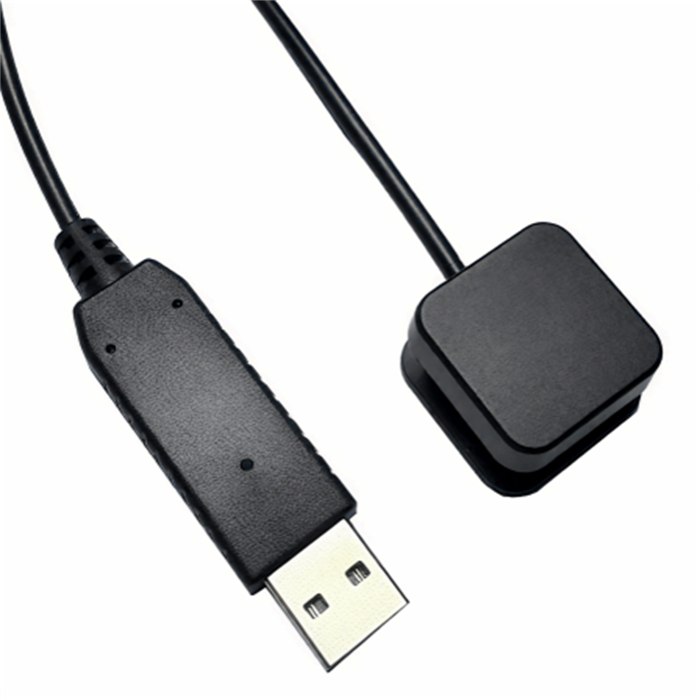
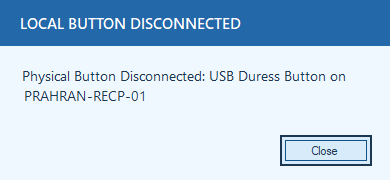
Add a physical button where it helps, from A$25 plus delivery. Unlike a hardwired button, Duress Alert warns you on screen the moment a button is unplugged, and confirms when it’s back, so you never discover a dead button during an emergency. And if a button ever fails, staff can still raise the alert from the screen, tray icon or hotkey.
Duress Alert warns on screen the moment a USB button is disconnected, and confirms when it’s reconnected, so you never discover a dead button during an emergency.
Under WHS law in every Australian state and territory, employers must provide a safe workplace so far as is reasonably practicable, and a duress alarm is a recognised control for occupational violence. Duress Alert’s dated raise → respond → reset history is evidence you can table.
For your IT provider
Your IT person (or ours) can push Duress Alert to every computer automatically, silent-install MSIs generated by the server with your configuration baked in, central management of every setting, and support for shared/remote desktops (RDS) and Mac. Client-to-server traffic stays on your local network (default TCP 8001); only the server talks to the cloud, over HTTPS, for licensing and reporting. Have an IT team, multiple sites, or shared/remote desktops? See our IT deployment page, silent installs, central configuration and rollout at any scale.
Does it work on Mac as well as Windows?
Yes. Windows and Mac clients are both supported, and alerts flow between them on the same site.
“Our receptionist hit the fixed button under the desk during a confrontation, and found out later it was broken. With Duress Alert she knows: if it’s green, we can see her.”
Sally Anderton, Legal Practice, VIC
Pricing
Team Safe
Group Safe
Corporate Safe
Multi Site Safe
One-off install A$99, includes training and 12 months of support.
Prices exclude GST. Local taxes are added where they apply.
Start your free 21-day trial, covering up to 25 computers. Configure it and roll it out across your site, at no cost. The trial itself is free. If you go ahead afterwards, we can set it up with you for a one-off A$99. When you move from the trial to a full licence there is no extra effort, everything you have set up simply keeps running. No payment details to start, and you can cancel anytime.
Prices in AUD. In the UK, USA, Canada or Europe? See local pricing: UK · USA · Canada · Europe.
Is a duress alarm the same as a panic button?
In Australia, “duress alarm”, “duress button” and “panic button” are used interchangeably. Duress Alert is the same product whichever term your policy uses.
The button itself
You find out when a button stops working
Tell us about your site.
Tell us your team size and setting, and we’ll show you how Duress Alert works on your own desks and what a rollout looks like. We get back to you quickly.
Add a desk button that tells you when it fails.
Questions? +61 1300 366 911 (Australia).